Optimising your operations with AI: start with the process, not the model
The fastest way to waste money on AI is to start from the technology. A team buys a tool, or gets excited about a model, and then goes looking for a problem to attach it to. The result is a pilot that impresses once and changes nothing.
The teams that get real operational gains run it the other way around. They start from a process they already understand, find the step that's slow or expensive, and automate that one step, keeping a person in the loop where it matters, measuring before and after. Small, proven, then expanded. That's what we mean by lean AI: the smallest change that moves a real number, shipped, before the next one.
This is the playbook: the order of operations, the handful of steps AI is genuinely good at, a worked example with numbers, how to decide how much autonomy to give it, what to measure, and the failure modes that quietly kill these projects.
The order of operations
1. Start from a process you already measure
If you don't have a baseline, you can't tell whether anything improved, and "it feels faster" doesn't survive a budget review. Begin with a process where you already track something: invoices handled per day, time to resolve a ticket, hours spent on a monthly report, backlog age.
If nothing is measured yet, measure first. A week of watching where time actually goes, shadowing the people doing the work, timing the steps, is worth more than a month of strategy decks. You'll often find the real bottleneck isn't where anyone assumed.
2. Map the process and find the one slow step
Draw the process as it really runs, step by step, including the handoffs and the waiting. Inside almost every process there's a step where skilled people spend time on work that doesn't need their skill: copying data between systems, reading a document to pull out three fields, drafting the first version of something, hunting for where a policy is written down, matching two lists by eye.
That step is the target. It's repetitive, it's a bottleneck, and it's exactly what current AI handles well. You're not trying to automate the whole process, you're trying to remove the part that wastes your best people's time and slows everything downstream.
3. Decide how much autonomy the step can have
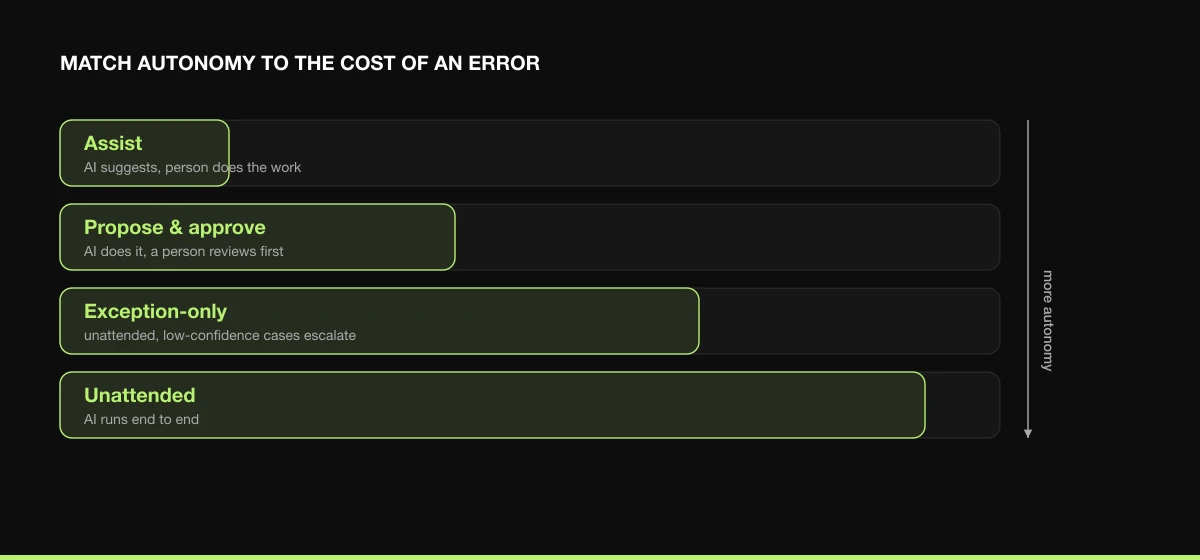
This is where the cost of error sets the design. Match the level of autonomy to what a mistake would cost:
| Level |
What it means |
Use when |
| Assist |
AI suggests; the person does the work with the suggestion in view |
The judgement is the job and stakes are high |
| Propose & approve |
AI does the work; a person reviews before it's used |
The default for most first projects |
| Exception-only |
AI runs unattended; only low-confidence cases go to a human |
Error rate is proven low and the model can flag its own uncertainty |
| Unattended |
AI runs end to end |
Errors are visible, cheap, and rare |
Almost every good project starts at propose-and-approve and earns more autonomy as the error rate proves out. Don't start unattended on anything that moves money or reaches a customer.
4. Build small, ship, measure
Resist redesigning the whole operation at once. Build the one step, ship it to a slice of real volume, and compare the same metrics you baselined. A change that takes a step from 14 minutes to 3 at the same error rate is a result anyone in finance understands. "We adopted AI" is not.
Each small, measured win funds and de-risks the next, and builds the trust you need before automating anything bigger. A string of shipped improvements beats one ambitious programme that's still "in progress" a year later.
The five steps AI is actually good at
Across operations teams, the same handful of steps come up again and again as the right first targets. They share a shape: high volume, low-to-medium judgement, messy input that rules can't fully capture, and a cheap way to catch errors.
| Step |
What it does |
Typical time saved |
Risk |
| Document extraction |
Pull structured fields from invoices, contracts, forms |
High, minutes per document, at volume |
Low with review |
| Triage & routing |
Read an incoming request and send it to the right place |
High, removes a manual sorting queue |
Low-medium |
| First drafts |
Proposals, replies, reports, summaries a person then finalises |
Medium-high, the blank page is the slow part |
Low (human finalises) |
| Internal lookup |
Answer "where is it written that…" from your own documents |
Medium, kills repeated searching |
Low-medium |
| Reconciliation |
Match records across two systems, flag what doesn't line up |
High, replaces line-by-line checking |
Low with review of flags |
None of these is glamorous. All of them give back hours a week, start at low risk, and have an obvious baseline to measure against. If you're looking for a first project, look here before anywhere flashier.
A worked example: invoice intake
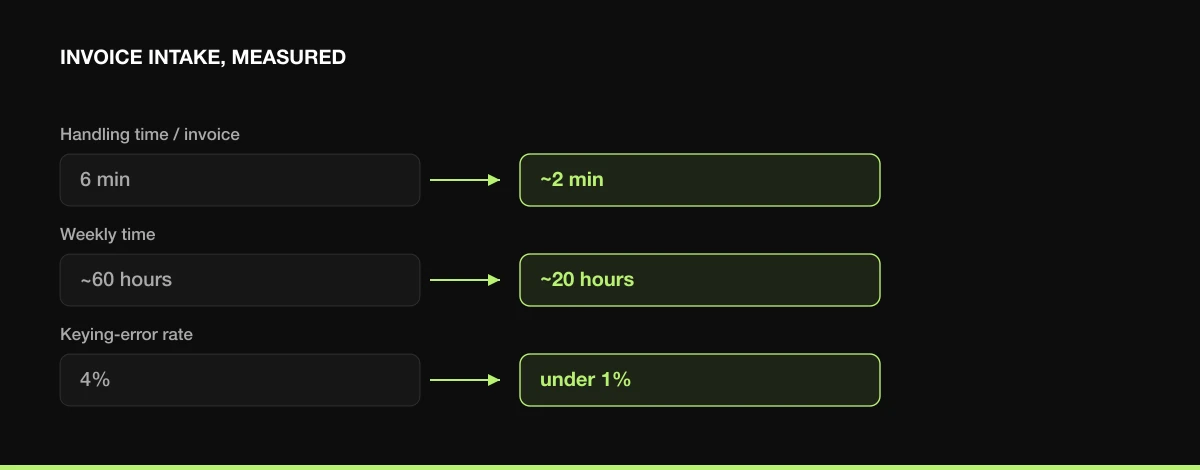
Take a finance team processing about 600 supplier invoices a week. Today each one is handled by hand: open the PDF, read off supplier, amount, due date, and PO number, key them into the accounting system, flag anything unusual. Roughly 6 minutes each, with a 4% keying-error rate that creates rework downstream.
The map shows the slow step clearly: it's the reading-and-keying, not the approval. So that's where AI goes. Extraction reads each invoice and pre-fills the four fields. The design is propose-and-approve: the person now checks and confirms a pre-filled entry instead of typing it from scratch, and the system routes only low-confidence extractions for closer attention.
The numbers after a few weeks on real volume:
- Handling time per invoice: 6 minutes → about 2 minutes (the person verifies rather than transcribes).
- Weekly time: ~60 hours → ~20 hours. Forty hours a week back.
- Keying-error rate: 4% → under 1%, because people catch errors better than they avoid making them.
What made it work wasn't the model, extraction is well-trodden. It was that the use case had volume, the data already existed in a consistent channel, a person stayed in the loop on a bounded-risk step, and there was a clean baseline to prove the result. The same shape transfers to claims intake, onboarding paperwork, and order processing.
What to measure
Instrument before you change anything, and measure the same things after. Four metrics cover most operational cases:
- Cycle time, how long the step takes, per unit and end to end.
- Throughput, units handled per person per day.
- Error / rework rate, how often the output is wrong and has to be redone.
- Cost per unit, the loaded cost of handling one item.
Watch the error rate as closely as the time saved. A change that halves cycle time but doubles errors is not a win, it just moved the cost downstream where it's harder to see. The goal is faster at the same or better quality.
Failure modes to avoid
- Automating a broken process. AI is a multiplier. Multiply a good process and you get more good; multiply a tangled one, unclear ownership, a bad handoff, and you industrialise the mess, faster. Fix the obvious process problems first. Sometimes that alone is the win and you don't need AI at all.
- Starting from the tool. A capability looking for a problem produces demos, not results. Start from the work.
- Skipping the baseline. If you didn't measure before, you can't prove after, and the project gets cut. This is the single most common reason good pilots die.
- Too much autonomy, too soon. Running unattended on day one, on anything with real downside, turns a small error rate into a public one. Earn autonomy.
- Boil-the-ocean scope. "Transform operations" is not a project. The one slow step you can ship this quarter is.
- No owner. A process change with no accountable owner drifts back to the old way within a month.
The shape of a good first project
Pull it together and the profile is consistent: a step that happens hundreds of times a week, on data you already have, where a person can catch mistakes cheaply, owned by someone who feels the pain, with a number you can baseline today. Ship that, prove it moved the number, then move to the next step. Optimising operations with AI isn't a technology decision, it's an operations decision that happens to use AI for one step.
That's how we run it with clients: map the process, find the slow step, design the right level of human oversight, ship a small proven slice, and measure. Start from the work, keep a person where it matters, and let the numbers make the case for what to automate next.


 Miguel Vicente Jr
